


Lepro LED Smart Light Bulbs 60W
Lepro LED Smart Light Bulbs 60W
- Voice Control in Smart Home: Works with Alexa and Google Assistant, allows you to control this smart light hands-free with simple voice commands. (e.g. "Alexa, dim the bedroom lights 30%")
- Remote Control from Anywhere: With the "Smart Life" App on your phone, you can easily turn on/off, set brightness, create timers and so much more, as long as the lights are connected to Wi-Fi.
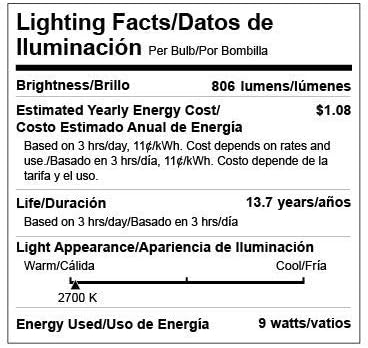
- Warm White Light, Fully Dimmable: Illuminate your room with soft warm white light (2700K, 9W=60W, 806lm). Brightness is adjustable via app or voice control, does not support traditional dimmers.
- Set Timers and Scene Modes: Set up multiple schedules for this smart light to turn on/off according to your daily routines, so you'll never come to a dark home. You can select different scenes for your desired lighting effect.
- Simple to Set Up: No hub or bridge is required, just screw into your lighting fixtures with E26 sockets. Simply download the free app, connect to your Wi-Fi (2.4GHz only), and you are ready to go.
Couldn't load pickup availability


WiFi Smart Lights Setup
Easy to Set up, No Hub or Wiring Needed
- Install Smart Life app and register an account, turn on the phone's Bluetooth and connect to the 2.4Ghz Wi-Fi.
- Switch on the light and keep it on for at least 10s, then turn it off for 5s.
- Turn the light ON-OFF-ON-OFF-ON, the bulb will start blinking rapidly.
- Add device, select bulb type, confirm the indicator is blinking or breathing.
- Input Wi-Fi password, wait for 100% connection.

Voice Control
Easy App Control
Timer & Schedule
Group Control
Adjustable Brightness
Hands-Free Voice Control
Works with Alexa and Google Assistant, gets hands-free voice control of your light.

App Control from Anywhere
Via the free app "Lepro LampUX", you can remotely control your smart bulb on the phone.

Auto On/Off Timer & Schedule
Add times for your smart lights to turn on/off automatically at scheduled times.

Group Control for Multiple Bulbs
Create a group for several smart bulbs so you can control them all with just one command.

Brightness is adjustable via app or voice control, does not support traditional dimmers.

Versatile Uses

Specifications
| APP | Smart Life |
| Color | Warm White 2700K |
| Light Output | 806lm (9W=60W) |
| Lifetime | 15,000 hrs |
| Beam Angle | 220° |
| Fitting Base | E26 |
| Voltage | 120 Volts |
| Adjust Brightness | Dim or brighten via app or voice control. Do not use with dimmers, which will damage the bulbs. |
| No Hub or Wiring Needed | Easy to set up. Install Smart Life app, register an account and connect the bulb to wifi in seconds. |
| Require 2.4G WiFi When Pairing | If your home WiFi has 5GHz, turn it OFF temporarily. Once you have the lights set up, you can turn it back on. |

WiFi Smart Lights Setup
Easy to Set up, No Hub or Wiring Needed
- Install Smart Life app and register an account, turn on the phone's Bluetooth and connect to the 2.4Ghz Wi-Fi.
- Switch on the light and keep it on for at least 10s, then turn it off for 5s.
- Turn the light ON-OFF-ON-OFF-ON, the bulb will start blinking rapidly.
- Add device, select bulb type, confirm the indicator is blinking or breathing.
- Input Wi-Fi password, wait for 100% connection.

Voice Control
Easy App Control
Timer & Schedule
Group Control
Adjustable Brightness
Hands-Free Voice Control
Works with Alexa and Google Assistant, gets hands-free voice control of your light.

App Control from Anywhere
Via the free app "Lepro LampUX", you can remotely control your smart bulb on the phone.

Auto On/Off Timer & Schedule
Add times for your smart lights to turn on/off automatically at scheduled times.

Group Control for Multiple Bulbs
Create a group for several smart bulbs so you can control them all with just one command.

Brightness is adjustable via app or voice control, does not support traditional dimmers.

Versatile Uses

Specifications
| APP | Smart Life |
| Color | Warm White 2700K |
| Light Output | 806lm (9W=60W) |
| Lifetime | 15,000 hrs |
| Beam Angle | 220° |
| Fitting Base | E26 |
| Voltage | 120 Volts |
| Adjust Brightness | Dim or brighten via app or voice control. Do not use with dimmers, which will damage the bulbs. |
| No Hub or Wiring Needed | Easy to set up. Install Smart Life app, register an account and connect the bulb to wifi in seconds. |
| Require 2.4G WiFi When Pairing | If your home WiFi has 5GHz, turn it OFF temporarily. Once you have the lights set up, you can turn it back on. |


Specs
LIGHT & PERFORMANCE
SKU
901002-US-4
Light Type
LED
Additional Features
Dimmable
Bulb Base
E26
Specific Uses For Product
Indoor use only
Indoor Outdoor Usage
Indoor
Light Source Type
LED
Control Method
Voice
White Brightness
806 Lumens
Efficiency
89.56 lumens per watt
Smart Home Compatibility
Smart Home Compatible
Light Output Maximum
806 Lumens
Connectivity Protocol
Wi-Fi
Frequency
2.4 GHz
Controller Type
Amazon Alexa, Google Assistant, Vera
Connectivity Technology
Infrared, Wi-Fi
BATTERY & POWER INFO
Wattage
9 watts
Incandescent Equivalent Wattage
60 Watts
Voltage
120 Volts
Power Source
Corded Electric
Power Consumption
9 Watts
Light Source Wattage
60 Watts
Accepted Voltage Frequency
100 to 120 Volts and 60 Hertz
PHYSICAL INFO
Bulb Shape Size
A19
Light Color
Warm White
Color Temperature
2700 Kelvin
MANUFACTURER & LOGISTICS
Warranty
& Support